IoT Heart Rate Monitor
Real-time heart rate monitoring system using Arduino and Digital Ocean VPS, sending SMS/Email alerts during abnormal pulse readings.
IoT Heart Rate Monitor - Real-Time Pulse Alert System
Project Overview
This project presents a 24/7 Remote Heart Rate Monitor that tracks a patient's pulse in real-time and immediately alerts caretakers or medical professionals via SMS and Email if abnormal metrics are detected.
Using an optical pulse sensor attached to the body, a local micro-controller calculates heart rates and forwards the readings to a secure cloud server. The system keeps caretakers connected to their patient's vitals, acting as a crucial early-alert system for cardiac emergencies.
Recognition & Achievement
This project was developed for a national competition, where it was recognized on the Internshala platform as a winning IoT medical solution for its high utility and direct implementation of consumer-facing cloud alerts.
 Winner showcase featured on the Internshala platform.
How It Works
The system operates across three distinct layers:
[Pulse Sensor] --(analog)--> [Arduino Uno] --(serial)--> [Bolt Wi-Fi Module]
                                                                |
                                                           (Wi-Fi Link)
                                                                v
[Twilio SMS] <--(API)--------- [Python Script on VPS] <---- [Bolt Cloud]
[Mailgun Email] <--(API)-----/
- Hardware Layer (Sensory): An optical pulse sensor detects blood dynamics in the finger. An Arduino processor parses these optical signals and calculates the beats-per-minute (BPM) value.
- Network Layer (Bridges): The Arduino communicates serial data directly to a Bolt Wi-Fi module, which logs the vitals to the Bolt Cloud.
- Cloud & Alerts Layer (Automation): A virtual private server (VPS) running on DigitalOcean queries the Bolt Cloud. If the heart rate violates safety thresholds (e.g., drops below 57 BPM or exceeds 100 BPM), the Python engine calls Twilio and Mailgun APIs to broadcast emergency SMS and email alerts.
Step-by-Step Implementation
Step 1: Connecting Hardware
Using jumper cables, assemble the following connections:
- Sensor to Arduino:
- VCC ➔
5Vpin of Arduino - GND ➔
GNDpin of Arduino - Output ➔ Digital pin
2of Arduino
- VCC ➔
- Bolt Wi-Fi Module to Arduino:
- VCC ➔
3.3Vpin of Arduino (or dedicated 3.3V power source) - TX ➔
RXpin of Arduino - RX ➔
TXpin of Arduino - GND ➔
GNDpin of Arduino
- VCC ➔
Step 2: Programming the Arduino
Write and upload the following script to the Arduino. This code calculates the pulse by counting signal spikes and resets the counter every 10 seconds:
unsigned long highCounter = 0;
int pulse = 0;
int val = 0;
int lastPulse = LOW;
unsigned long oldMillis = 0;

void setup() {
  pinMode(2, INPUT);
  Serial.begin(9600);
}

void loop() {
  pulse = digitalRead(2);
  if (pulse != lastPulse) {
    lastPulse = pulse;
    if (pulse == HIGH) {
      highCounter++;
    }
  }

  // Calculate and transmit BPM every 10 seconds
  if (millis() - oldMillis >= 10000) {
    oldMillis = millis();
    val = highCounter * 6; // Extrapolate to 60 seconds
    if (highCounter > 1) {
      Serial.println(val); // Broadcast BPM over serial link
    }
    highCounter = 0;
  }
}
Step 3: Circuit Diagram & Schematic
Below is the wiring diagram to make these connections:
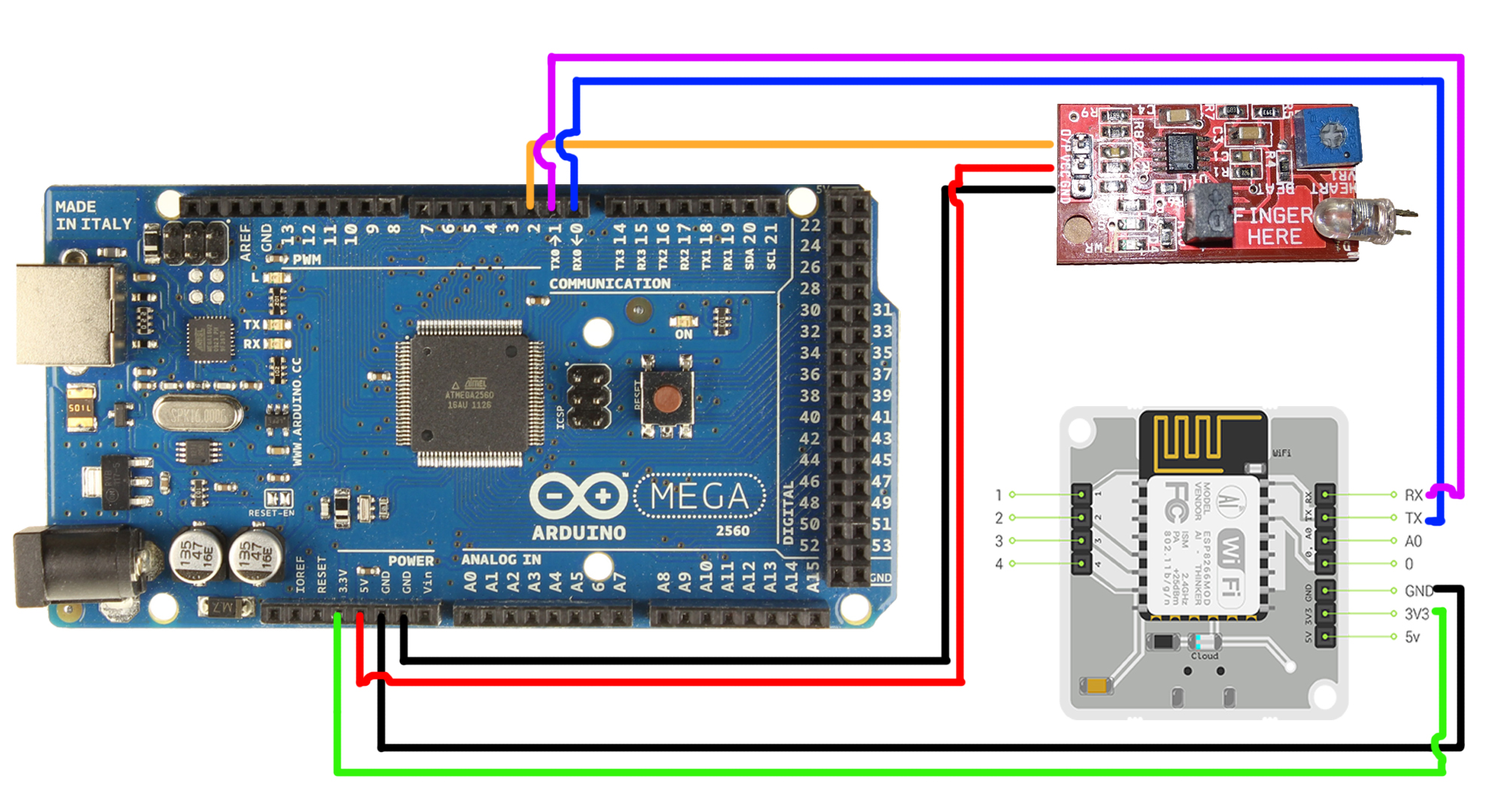 The full hardware wiring schematic connecting the pulse sensor, Arduino, and Bolt Wi-Fi module.
Step 4: Configuring Automation Credentials
Create a configuration file (conf.py) on your cloud server (e.g. DigitalOcean VPS) containing your API credentials:
# credentials from Twilio (SMS provider)
SID = 'your_twilio_sid_here'
AUTH_TOKEN = 'your_twilio_auth_token_here'
FROM_NUMBER = 'your_assigned_twilio_phone_number'
TO_NUMBER = 'recipient_phone_number' # e.g. '+919876543210'

# credentials from Mailgun (Email provider)
MAILGUN_API_KEY = 'your_mailgun_api_key_here'
SANDBOX_URL = 'your_mailgun_sandbox_url_here'
SENDER_EMAIL = 'alert@your_sandbox_url'
RECIPIENT_EMAIL = '[email protected]'

# credentials for Bolt IoT Cloud
API_KEY = 'your_bolt_cloud_api_key'
DEVICE_ID = 'your_bolt_device_id'
Step 5: Alerts Script (Python)
Write the automation daemon (heart_rate.py) on your VPS. It reads values from the Bolt Cloud and issues API alerts if safety limits are broken:
import conf, json, time
from boltiot import Email, Bolt
from boltiot import Sms

# Set safe physiological thresholds
minimum_limit = 57  # Bradycardia alert limit
maximum_limit = 100 # Tachycardia alert limit

mybolt = Bolt(conf.API_KEY, conf.DEVICE_ID)
mailer = Email(conf.MAILGUN_API_KEY, conf.SANDBOX_URL, conf.SENDER_EMAIL, conf.RECIPIENT_EMAIL)
sms = Sms(conf.SID, conf.AUTH_TOKEN, conf.TO_NUMBER, conf.FROM_NUMBER)

while True:
    response = mybolt.serialRead('2') # Read from Arduino via Serial
    data = json.loads(response)

    if data['success'] == 1:
        try:
            sensor_value = int(data['value'])
            print("Current Heart Rate:", sensor_value, "BPM")

            if sensor_value > maximum_limit or sensor_value < minimum_limit:
                alert_msg = f"EMERGENCY ALERT: The Current Heart Rate is {sensor_value} BPM!"
                print("Sending alert notifications...")

                # Send email and SMS alerts asynchronously
                mailer.send_email("Emergency Alert", alert_msg)
                sms.send_sms(alert_msg)

        except ValueError:
            print("Invalid reading received.")
    else:
        print("Error fetching values from Bolt Cloud:", data['value'])

    time.sleep(10) # Poll cloud server every 10 seconds
Run the script on the cloud machine:
python3 heart_rate.py
Outcome & Real-World Impact
- Continuous Vitals Monitoring: Replaces expensive stationary hospital monitors with a lightweight portable kit suitable for elderly patients at home.
- Immediate Out-of-Band Alerts: SMS and Email channels guarantee that alerts reach caretakers even if they are away from their computers.
- High Utility at Low Cost: Using affordable microcontrollers and cloud VPS resources, the device is accessible and scalable.
Need a web application like this?
I help businesses and individuals turn complex ideas into refined, high-performance solutions. Let's discuss how I can help with yours.